
Verify only risk requires when it
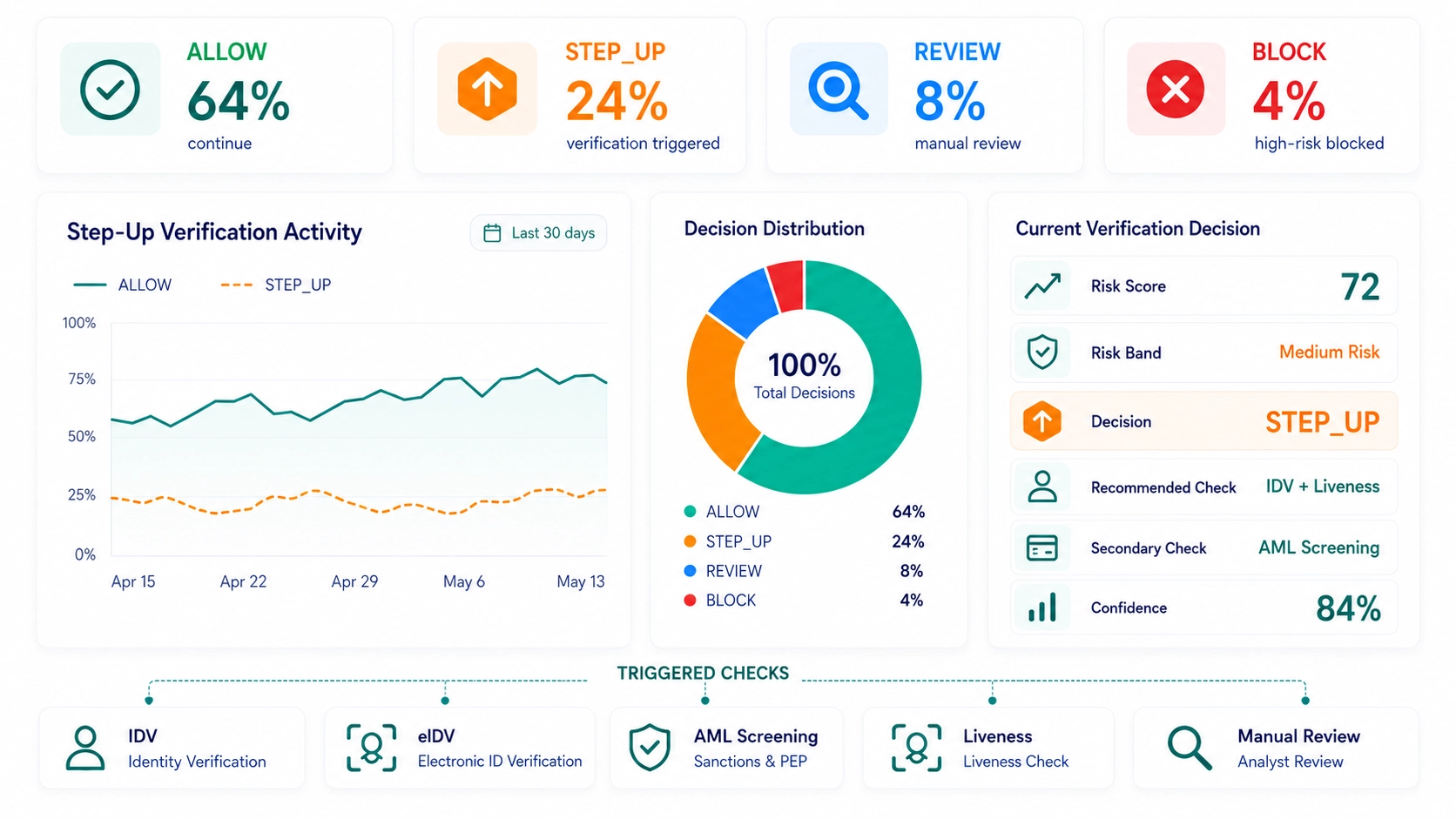
ScreenlyyID helps teams decide when a user can continue, complete step-up verification, move to review or be blocked. Assess risk first, then trigger IDV, AML, eIDV, liveness or manual review only when more assurance is needed.
- Reduce unnecessary verification
- Step-up verification
- Keep trusted users moving
- Fraud-first decisioning
The Problem
Blanket verification creates unnecessary friction
Sending every user through the same verification flow adds cost, slows good customers and creates avoidable drop-off. Risk-based verification gives teams a better way to decide who can continue and who needs a stronger check.
What ScreenlyyID Does
Turn risk signals into the next action
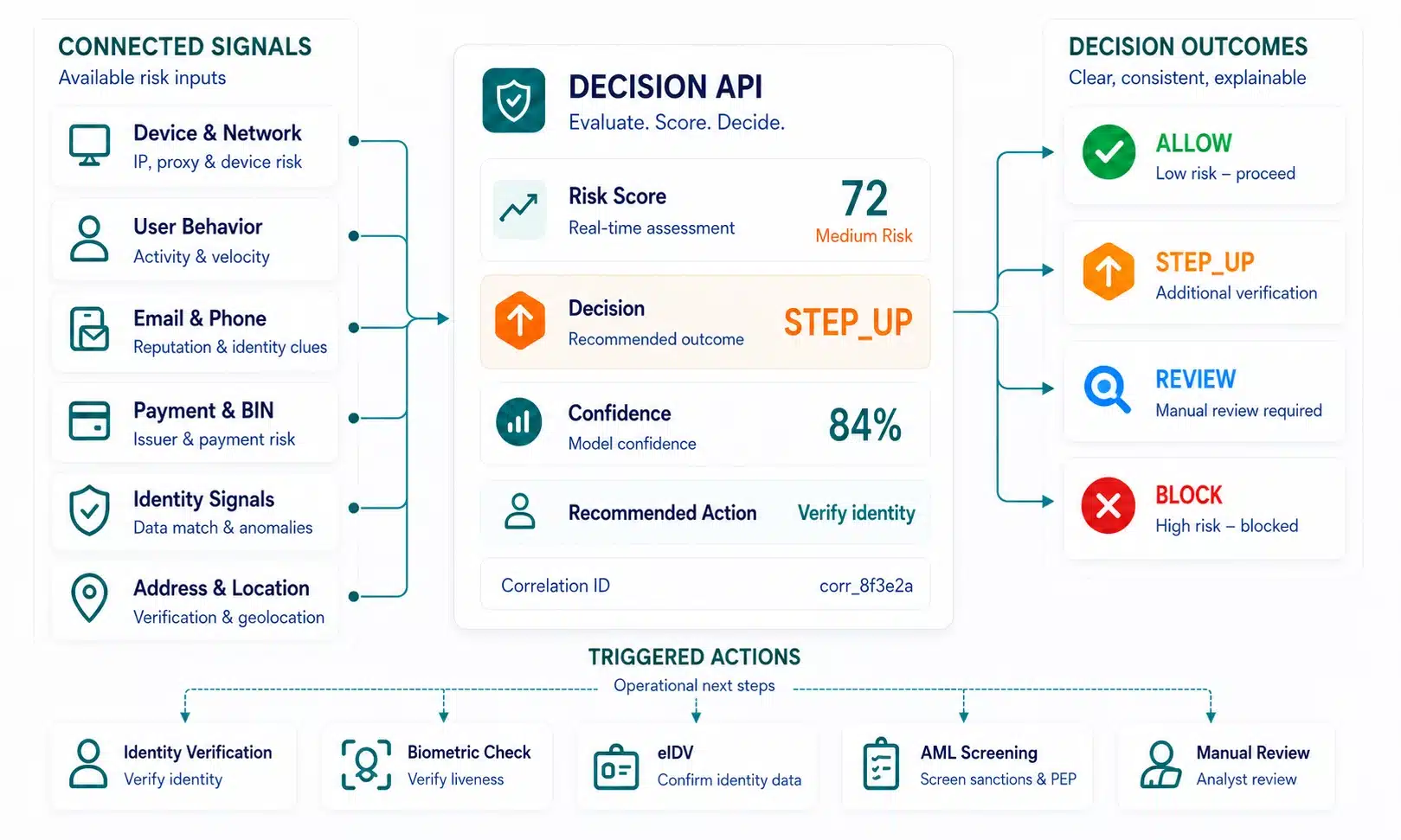
ScreenlyyID uses available identity, email, phone, IP, user agent, payment and compliance signals to return a clear decision: allow, step up, review or block. Step-up verification becomes a targeted response, not the default path for every user.

How it Works
Score risk, then trigger step-up verification
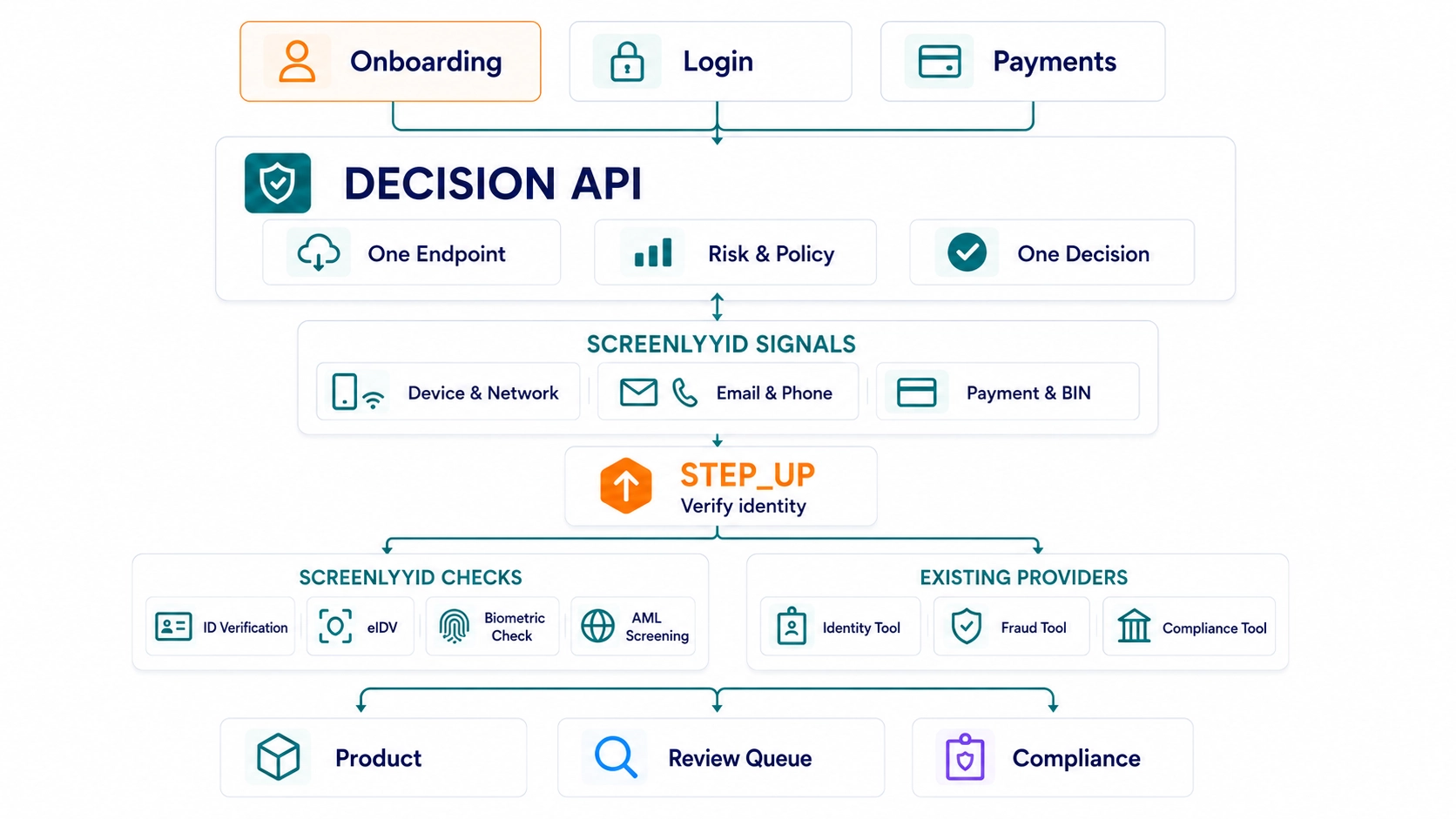
Send a risk event to the Decision API. ScreenlyyID enriches the available signals, scores the event and returns the recommended action. If risk is high enough, your team can trigger IDV, liveness, AML, eIDV or manual review based on policy.
01
Event received
Onboarding, login, payment or account change event.
02
Signals checked
Email, phone, IP, device-context, payment and identity signals.
03
Decision returned
Risk score, risk band, top factors and next action.
04
Step-up triggered
IDV, AML, eIDV, liveness or review when required.
Verification Actions
Use the right verification for the right risk
Different risk moments call for different actions. ScreenlyyID helps route users toward the appropriate step-up path when extra assurance is needed.
Decision Outcomes
Give every KYC event a clear next action
Risk-based KYC should return more than a score. ScreenlyyID turns risk context into clear decisions your teams can act on: allow, step up, review or block.
Decision-First Protection
One decision layer across fraud, identity, and compliance
Show us your onboarding, login, payment or compliance journey and we’ll show where ScreenlyyID can reduce unnecessary verification, trigger stronger checks and improve risk decisions.
- Connected risk signals
- Real-time decisioning
- Reusable orchestration
Flexible Deployment
Add step-up logic without replacing your stack
ScreenlyyID can sit before and around your current verification stack. Use the Decision API to decide when stronger checks should run, while keeping the providers and workflows your team already uses.
Where it Fits
Step up at the right risk moment
Use step-up verification when a user action carries more risk than the standard flow should allow. ScreenlyyID helps assess the event first, then route the user to the right check only when more assurance is needed.
For Teams
Give review teams the reason behind each decision
When a sensitive change is stepped up, reviewed or held, teams need a clear reason. ScreenlyyID can return the score, top factors, checks run and correlation ID behind the decision

Platform Coverage
Use lifecycle signals to protect sensitive changes
Risk changes after onboarding. ScreenlyyID helps use the context available around each sensitive event to support better account change decisions.
Common Questions
Step-up verification questions
Common questions about step up verification. See how ScreenlyyID helps teams trigger stronger checks only when risk requires it.
Step-up verification is an extra identity, compliance or review check triggered when risk is higher than normal. Instead of verifying every user the same way, businesses can use risk-based verification to decide when more assurance is needed.
Risk-based verification helps lower-risk users continue with fewer interruptions, while higher-risk users are routed to stronger checks such as IDV, liveness, AML, eIDV, address verification or manual review.
Step-up verification can be triggered by elevated risk scores, mismatched identity signals, suspicious IP or network risk, payment risk, account changes, compliance requirements or customer policy.
No. ScreenlyyID can work with your existing KYC, IDV, AML, fraud and review tools, or provide IDV, KYC and AML capabilities through its own verification suite. The Decision API helps decide which checks should run, when to step up and when lower-risk users can continue.
Yes. ScreenlyyID can recommend or trigger checks such as IDV, KYC, AML, eIDV, liveness, address verification or manual review when risk or policy requires it. Some verification products may require separate activation, regional availability and pricing.
Contact Us
See Risk Decisioning in Action
See how ScreenlyyID helps you evaluate risk, orchestrate decisions, and trigger verification only when needed.
Complete the form and we’ll walk you through how it fits into your existing stack and improves fraud prevention, conversion, and cost efficiency.
- See real decision flows
- Understand integration
- Explore use cases
- Get tailored pricing
Start small. Scale fast.
See how risk decisioning fits into your flow
Walk us through your onboarding, login, payment, or compliance journey and we’ll show where decisioning can help you approve trusted users faster, trigger the right checks, and stop high-risk activity earlier.
- No Set Up Fees
- API-first integration
- Works with your stack